

Panedia vs Streetview
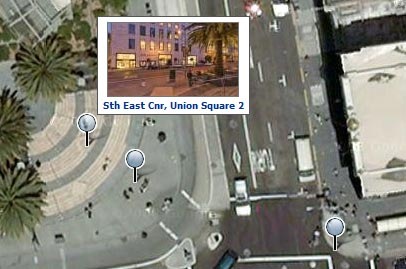
People familiar with Google’s Streetview, which is basically panoramic virtual tours on maps, would be forgiven for thinking Panedia is just another ‘me too’ effort. Allow me to show you how this is not the case. There are fundamental differences between Streetview & Panedia, which produce vastly different end results. One isn’t better than the other, they are both great technologies, but they both serve very different purposes and potentially different markets. Core Philosophies Google Streetview Goal: Add visuals to maps so people can look around on the ground, enabling greater understanding of a specific location or area. [Link Out] Result: Attach panoramic cameras to cars and drive down all streets in a city taking images. Add panoramas to maps. [Larry Page’s Idea] Panedia Goal:Use Panoramic Virtual Tours to produce the worlds best destination content and create a visual archive of our changing world. Make the content available in as many mediums as possible. Result: Use professional photographers & equipment along with extensive automated workflows to produce some of the most beautiful destination content available. Shooting places of interest & of historical value. Use the content in may ways including adding it to maps for online viewing. Practical Results As you would expect these philosophies lead to very different results where Street View & Panedia overlap, ie on maps. Panedia = Low quantity of extremely high quality panoramic virtual tours on maps.Google Street View = Vast quantity of low quality panoramic virtual tours on maps. Google Streetview – Cnr Geary & Stockton St – Union Square, San Francisco. Panedia = Low quantity of extremely high quality virtual tours...
A Refreshing Take on Usability
Last week Ben Scheirman over at the Flux88 blog did a quick review of an important feature on our Wallpaper site. He noted that we read user information from visitors to wallpaper.panedia.com and customise the site to their needs as best we can. This feature started as a simple concept that grew to become a very useful aspect of the site. We have plans to further extend this type of functionality over time. Thanks...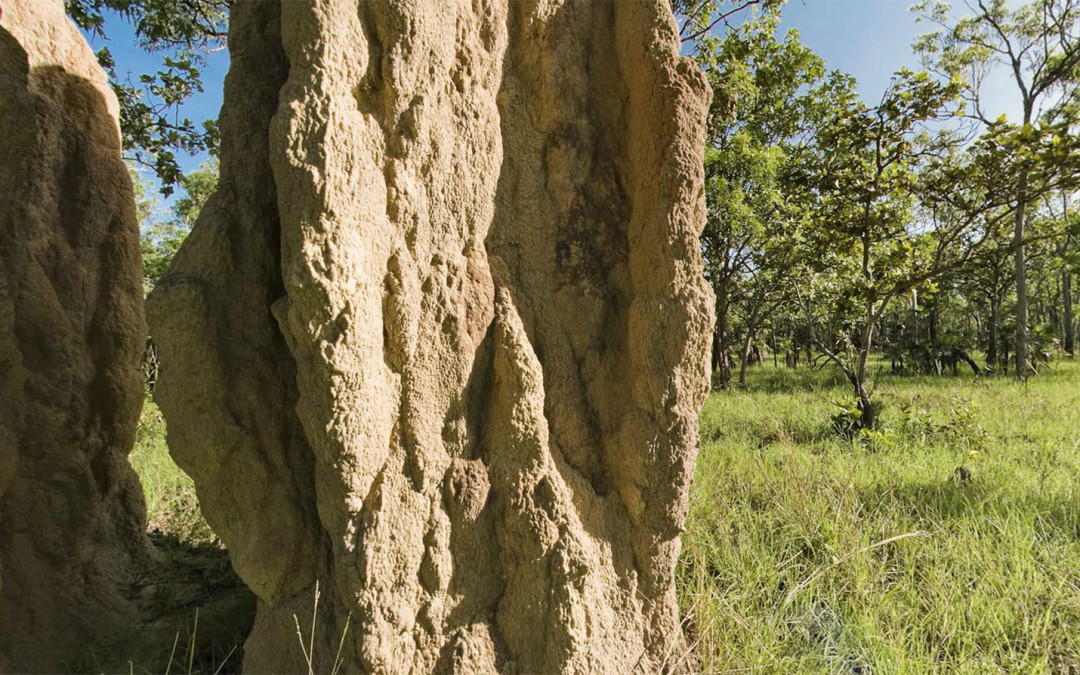
3500+ Mapped Virtual Tours
3513 Virtual Tours are now online at Panedia. With hundreds more in the pipeline, 4000 should be coming up soon. I’ve been busy stitching panos from Darwin in the Northern Territory of Australia. Panos I shot back in December that haven’t been prepped until now. Among those panos are amazing huge termite mounds and waterfalls in Litchfield National Park about 90 minutes drive outside of Darwin, & the Aviation Museum near the Darwin Airport. Here’s a view inside the wheel bay of a B-52 bomber at the Aviation Museum. The B-52 is the centerpiece of the museum taking up much of the total floor...
Introducing Panedia Desktop Wallpaper
With Panedia Wallpaper I’m introducing the first of many products and services to come out of the huge Panedia panoramic content library. The site has been up for a few weeks testing in narrow release, today we give it the official heave ho into wide release. (Tell your friends about it Panedia Desktop Wallpaper contains over 40 wallpapers at present, with a ‘Free Daily’ wallpaper being added every day. The daily wallpaper update is available free for 24hrs only, before it goes into the members gallery. There is also a public gallery (free) which is added to monthly. Each wallpaper on the site is available in 16 sizes from 800×600 to 2560×1600 for single, dual and triple monitors in the 3 common ratios 4:3, 5:4 & Widescreen (16:10). We produce 130 separate images for each wallpaper to provide all the sizes for MAC and PC computers. Members (paid) have access to all wallpapers at all times, plus the master files used to generate the wallpapers. With these files members can cut up their own wallpaper sizes, for up to 4 or 5 monitors. We’re working on tools to enhance this capability in the short to medium term. Members can also use Panedia Wallpaper as a form of Service, I’ve called it WAAS (Wallpaper As A Service) for want of a better term, whereby they need not horde images on their computers for wallpaper. A member can access the site at any time from any computer and download the exact size image(s) they require. Using the ‘Set As Desktop Background’ function of Internet Explorer, Firefox or Safari the wallpaper image...
So here I am
I’m Ricky, the first non-Aaron photo-taking-guy. I also don’t have a title yet. Photographer is OK, it fits the bill, but it seems too mundane for something as outrageously cool as Panedia. As Aaron said, my background is in commercial photography, and I come to Panedia from RMIT University, where I was a student and more recently the photography department technician. Now THAT was an inadequate job title, I tells ya. Basically I fixed stuff what needed fixin’, and that meant I picked up a few basic engineering and electronics skills along the way, which I will be bringing to Panedia in the form of some cool gadgetry to help future photographers do their job faster and more accurately, as well as my hopefully self-evident photographic talents! At the moment I’m working on our vast backlog of images from the recent Fraser Island junket/meet-and-greet/Panedia team-building exercise ’08, polishing them up ready to be put through the Panedia production line. One of the issues Aaron and I have encountered along the way thus far now that photography is coming in from different streams, is how do you keep things consistent in terms of the overall ‘look’ of the images. As photographers, we all have our own ideas about what constitutes a nice-looking image. It’s open to interpretation at the best of times, but with something like Panedia it is vitally important that the look and feel of the imagery is relatively consistent. Over the coming months we will be developing a ‘look book’ that contains presets for the basic conditions we will be shooting in, which should lead to being...
Page 1 of 11